19 comments found.

Hi, Pre-Sales question: Do we need to input the full address of the business in order for this to work and for them to display on the map? Can we only input the city and ZIP?
Hi there,
Thanks for reaching out, yes you can only put city and zip only, however, it will not pin point to the exact coordinate of your stores. You can use the drag and drop marker to pin point to the exact location or enter lat and long manually which may work.
Thank you for your answer. Yes, because the listings are instructors who do not have physical locations. We just want someone to enter their zip to find instructors who teach within a zip code radius. So, i guess this could work. Would your regions addon make sense for this?
You’re welcome. Yes, it could work.
We do not have a region add-on. The regions are basically address shortcuts, the off-the-shelf plugin will display store results based on radius setting set at admin settings page, more details available in this knowledge base article here https://superstorefinder.net/support/knowledgebase/how-to-change-distance-radius-settings/
Alternatively, you can try to use the country filter which is available here http://superstorefinder.net/support/knowledgebase/country-filter-super-store-finder-wordpress/
If you would like to display stores based on group and display store results by ignoring the distance radius setting, this may require customization where you need to add a list of state then assign each store to state so it can be filtered, more details available in this knowledge base article here https://superstorefinder.net/support/knowledgebase/grouping-stores-in-super-store-finder/
Based on Codecanyon support policy here, the off-the-shelf product features come as it is as per item description and live preview page, customization is not part of the support scope, however can be requested to our devs team via the contact form here https://codecanyon.net/user/highwarden if needed.
Thank you for the detailed reply. With the ZIP Radius search, is it possible for when the plugin returns results, that it can display a visual graphical circle on the map of the radius? So like… if I search for listings within 10 miles of X zip code, a visual colored (opaque) circle displays on the map that covers that area? And then users can just see the results in the listings area? We don’t need map markers for individual listings, but a colored area visualization would be nice.
Unfortunately, this is not available in the off-the-shelf plugin however can be requested for customization if needed.
Hi, in the future it would be a nice value-added feature to the plugin I think
Yes, indeed this is something we can add in the near future.
Hi, I have a question: Can the Distance Radius be use for Organization branches only (sample organization have 1-3+ offices in all state in US and Canada if in-state 3+ branches they meet on one location “meeting location”) can this be accomplished with this maps? (no interested in other store or movie and other on the map to see what office Distance
Hi there,
The distance radius is an add-on which will require the main plugin Super Store Finder for WordPress which is available here. This add-on function (as per item description page) is to set and show a set of distances for end user to select from the store locator.
For your requirements, you can add 3 map markers for the office locations and one marker for the meeting location if we understand your requirements correctly. Best to check the features in item description page as well as test the live demo first before purchase.
Hi i try to add a decimal value on the distance 0.5km since we need it a meter radius from our store, but its not working. could you please check
Hi there,
Thank you for your inquiry, if you’re facing issue, kindly provide below details we can open a ticket and get our tech team to have a closer look
1) url of store locator
2) screenshot / description of the issue
3) temporary WP admin access
4) temporary FTP Access
Hello, I have a pre-sales question. I am building a multi vendor woocommerce site and would like to know if this plugin will enable the user to utilize a search for all individual items for sale from all vendors within their state or by nearby, radius etc. ? Thank you, Mitchell
Hi there,
Thank you for your inquiry, the plugin is compatible with WooCommerce however it will not be able to link to individual items for sale in woocommerce, this feature is not available, available features are only listed in the item description page. If you have a special request, you can request our devs team to perform customization which can be requested via the contact form here.
Hello, What are the items from the woocommerce database which are displayed on the map? In a multi vendor site will the individual vendor locations be shown on the map? Thank you, Mitchell
Hi Mitchell,
Thanks for the details, none of the vendor locations from WooCommerce will be displayed on the map. You will need to enter the locations manually or import via CSV into a custom database.
Hi highwarden, Thanks for your reply, but I would like to know is anything displayed dynamically on the map from the existing woocommerce data? What is the integration, is there any shared data? Is your plugin basically a standalone app? Thanks Again, Mitchell
Hi there,
Apologize for the confusion and misunderstanding, there’s no data from WooCommerce currently being displayed dynamically on the map. The compatibility list is just to show that the plugin will run and work well with a WordPress site installed with WooCommerce.
Hi, Thanks for your reply, any plans to display woocommerce data dynamically ?
Hi there,
At the moment, there are no plans yet, feel free to post your suggestions on our wishlist forum here and our devs team might be able to analyze and include it in future development.
HI,
We have recently purchased the radius add on and it works as it should, but due to the way the options such as categories, radius, region show in closed accordion / expandable sections on the left of the search bar. Its not obvious to a user when they come to the page that a radius is being applied to what they search for by default.
Is there a way to have this option next to the search bar in a form select box or have this accordion item automatically open on page load so its clear that they are searching in a radius of the location they type?
Thanks
Hi there,
Thank you for your inquiry, our devs team feedback as below, in order to open Distance Filter by default upon page load.
Devs feedback:
Kindly open wp-content\uploads\ssf-wp-uploads\addons\ssf-distance-addon-wp/mega-superstorefinder.js and go to the most bottom of the page and put below code
jQuery(function() {
    setTimeout(function(){
        jQuery('#filter__distance .filter__toggler').trigger('click');
    },3000);
});
Hello, this add on is not working. It’s turned on, added miles and nothing shows on the front end.
Hi there,
Thank you for your inquiry, try to clear your browser cache and refresh to page after installing the add-on. If you’re still facing an issue, kindly provide below details via the contact form here https://codecanyon.net/user/highwarden and we can open a ticket to get our tech team to have a closer look
1) url of store locator
2) link to screenshot / description of the issue
3) temporary WP admin access
4) temporary FTP access
Hi can plugin show popup turn on loction for user (agree or not). after agree browser using location, Plugin will load user location
Hi there,
Thank you for your inquiry, yes this is the standard method from Google Maps Platform, if you’re using the geo location feature, the user will need to agree first to allow location sharing before nearby stores will be shown.
Sep 29, 2017: Thank you for your tremendous support. We greatly appreciate it!
Also, is it possible to calculate distance from the person’s current location. So even is they search a neighboring city for locations, example: https://beta.boosterjuice.com/stores/ “Calgary”, it’ll calculate stores from user’s present location, to stores within the city of “Calgary”
Hi there,
The distance is based on user location if user click on the geo location icon, otherwise it will be from the city or location at the search bar. For customization, you can request it via the contact form here https://codecanyon.net/user/highwarden
Ok, I emailed you regarding my previous issue. What’s the cost to modify that field so it calculates upon the user’s current location
That’s great, our technical team should be able to liaise with you via email.
Hello, I’m having an urgent issue, where our distance calculations are happening in Miles. I’ve tried to change the Matrix settings from Miles to KM within the administrator panel, but they aren’t converting to KM. https://beta.boosterjuice.com/stores/
Hi there,
If you changed the distance matrix WP Admin > Super Store Finder > Add-on page > cog wheel settings icon (under distance radius add-on), it should convert the distance accordingly after you clear cache and refresh. If you’re still facing issues, you can send below details via the contact form here https://codecanyon.net/user/highwarden for our technical team to check.
1) url of store locator 2) temporary WP admin access 3) temporary FTP access
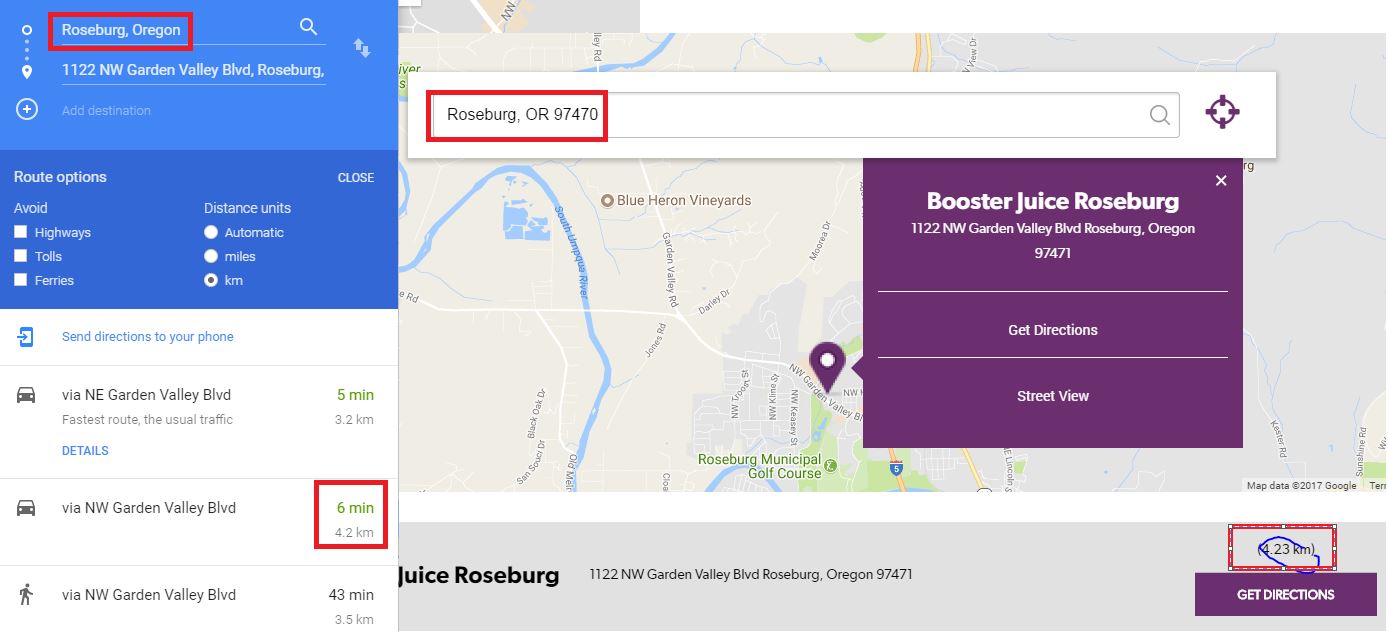
When I try to calculate a distance from a location to my detected location. Google maps says 2.0km, and ours page says 1.52km. Here’s my page. https://beta.boosterjuice.com/stores/ what’s causing that difference?
Hi there,
Thank you for your inquiry, the distance displayed at the result list is based on either from your location if you’re using geo location enabled or from the search location (based on the search text) to each of the addresses. If you click get directions it will show a few routes at the bottom and it will pick the regular route. Here’s a screenshot for better understanding.
I actually think https://beta.boosterjuice.com/stores/ it’s a miles to KM issue, because the values shown here, even though it says KM, shows in miles, when you multiply by 1.6, it makes the values in Google Maps when you load up.
We’ve tested the original plugin it’s converting the distance correctly.
Hi, does this addon enable being able to see the distance from origin to store on the results list?
Hi there,
Thank you for your inquiry, you can view the distance list from the result list details based on our demo site here https://superstorefinder.net/superstorefinderwp/addon/distanceradius/
If you wish to view more detailed distance, you can click on Get Directions link.
After I upload this plugin the page just goes blank.. I’ve unzipped it properly
Hi there,
If you’re downloading the latest version of Distance radius add-on, please update Super Store Finder for Wordpress and all other add-os as well, clear cache and refresh the page. You can refer to the upgrade instructions available here https://superstorefinder.net/support/knowledgebase/super-store-finder-for-wordpress-upgrade-instructions/
I have done this.. still not working. I will email you through support
Hi there,
Sure you can send your details via the contact form at our profile page here so our technical team can assist you https://codecanyon.net/user/highwarden
can a user type in their own radius?
p.s. this really should be part of the base package
Hi there,
Thank you for your inquiry, admin can enter specific radius lists from the admin where end user can choose from there which provide convenience and simplicity in the user interface. More info on how to do this available here https://superstorefinder.net/superstorefinderwp/user-guide/#document-26
If you wish to have text input at frontend for users to enter radius, this feature might not be needed by everyone and can be requested as customization via our profile page here https://codecanyon.net/user/highwardenHi, Is there a way to set a default distance? Thanks!
Hi there,
Thank you for your inquiry, the first distance added will be the default distance, you can delete and re-add the distances to ensure the first one is the default selected distance.
Nice, nice, nice…
Thanks for the great feedback! 
Great work!
Good sales!
Thank you for the wishes!
When I upload the ssf-distance-addon-wp.zip file under addons the error message “Please upload a valid add-on zip package for Super Store Finder” appears. Please help me out here. thx
I’m using WordPress 4.5.1
Hi there,
Thank you for your inquiry, you will require to upgrade the core version to 3.3 which is downloadable via Codecanyon (kindly backup your database and files, just in case so you can rollback) as we’ve added compatibility with Distance Radius addon ( more info available in patch notes here http://superstorefinder.net/support/forums/topic/super-store-finder-for-wordpress-patch-notes/ )
ok, so I go to Super Store Finder, download the latest version and install it in Wordpress (like any other new plugin), right? the stores and any other settings will remain in the system or are they gonna be deleted? BR
Hi there,
Kindly backup the plugin files and your database first just in case, when you reinstall or reupload the latest Super Store Finder core plugin, the stores and other data settings will remain.
thank you for your answer.
I can’t get it running…......I can’t delete the plugin and reinstall it. When deleting the plugin the data will be gone, right? Reinstall is not possible, ‘cause the directory exists…Replacing the directory “superstorefinder-wp” with the new version is also not helping….so please tell me how I can you this radius plugin
HI there,
You can delete the plugin and reupload, it will not remove the data.
Great work. GL
Thank you very much for the best wishes